IU Expand’s new look and functionality
Active catalog administrators will notice a few changes in the look and feel of IU Expand.
Archive & Reactivate
Older listings can now be archived. With the “Archive” option from your catalog Listings admin page, you can move a listing from the default “Active” tab to the “Archived” tab. Later, if needed, you can “Reactivate” the listing, bringing it back to Active listings to edit for viewing and enrollment. The Archive tab let’s you keep your catalog tidy and only display current offerings, while still preserving past listings that you might reuse.
Drop-Down Navigation
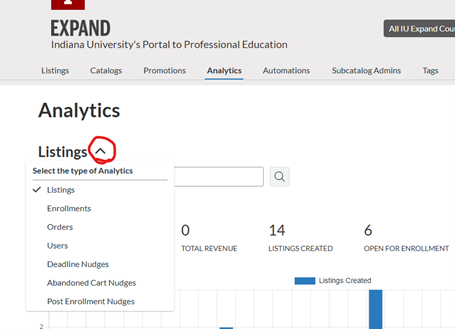
The Analytics admin tab has been reimagined as a caret drop-down menu instead of a horizontal menu. This consolidates the analytics tool reports and allows admins to expand then select the report they desire to view, filter, and export.