

GenAI 101 takes badging to a new level
In August 2025, Indiana University introduced a new, free artificial intelligence course, GenAI 101. When GenAI 101 was released, all IU students were auto enrolled in the course, and IU faculty and staff had the option to enroll in the course at no cost. Shortly thereafter, a special version of the course was launched for the university’s 805,000+ living alumni.
To date, the GenAI 101 course is the highest enrolled course to utilize the Parchment Digital Badges system (formerly Canvas Credentials), which is a tool available to all faculty, students, and staff at every Indiana University campus. Digital badging offers a quick, user friendly, scalable method for recognizing students' achievement of verified skills and micro credentials. The launch of GenAI 101 presents lessons in how to effectively incorporate digital badges into online coursework.
Learners in the GenAI 101 course are encouraged to complete a learning pathway, in which they can earn a milestone badge for each completed module leading to the GenAI 101 Certified Microcredential. This microcredential is shareable across all social media sites, LinkedIn (feed or profile), and can be used in e-mail signatures or placed on websites. To date, GenAI 101 has issued a total of 25,000+ badges, while the GenAI 101 Certified Microcredential has been awarded to over 4,400 users and more than 1,600 have shared the microcredential, most of them via LinkedIn Profile and Feed.
Digital badging helps drive learner engagement and rewards learners in real time for their achievements. There are now more than 60 departments actively using digital badging across all campuses. When it comes to IU Expand coursework, 17 catalogs use digital badging in their noncredit offerings and 22 catalog admins have inserted Parchment Digital Badging into their Canvas LMS course, which allows for the auto-awarding of badges upon completion of specific modules or assignments, or completion of a course.
The Parchment Digital Badging system is easy to use and offers multiple badge award options including manual award by student or group of students, LTI tool to auto-award in a Canvas course, and QR code for in-person learning events, workshops, or student experiences. In addition, the digital badging team is available to provide answers to questions and support as you get started with your digital badging journey.
Step 1: Create An Issuer Account
Opening an Issuer Account in Parchment Digital Badging is quick and easy. Send the following information to iubadges@iu.edu to kickstart your issuer account set-up.
- Department/Unit Name – Who is awarding badges?
- Short Description of Awarding Department/Unit
- Link to Awarding Department/Unit
- Logo of Department/Unit (optional)
- List of Staff that need administrative access
Step 2: Design Your Badge(s)
To design a badge, you need four required pieces of metadata:
- Badge Icon/Image
- Badge Name
- Short Description of the Badge
- Earning Criteria
In addition, there are several other optional features that can be used as metadata to add even more value to your digital badge. These include Achievement Type, Demonstrated Skills, Tags, Expiration Date, Additional Info, Standard Alignments, and the option to print a certificate. For more information on metadata requirements, see Parchment Digital Badges Metadata Short Form.
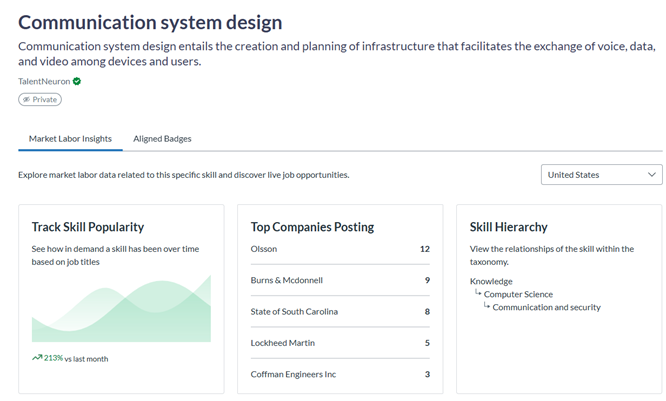
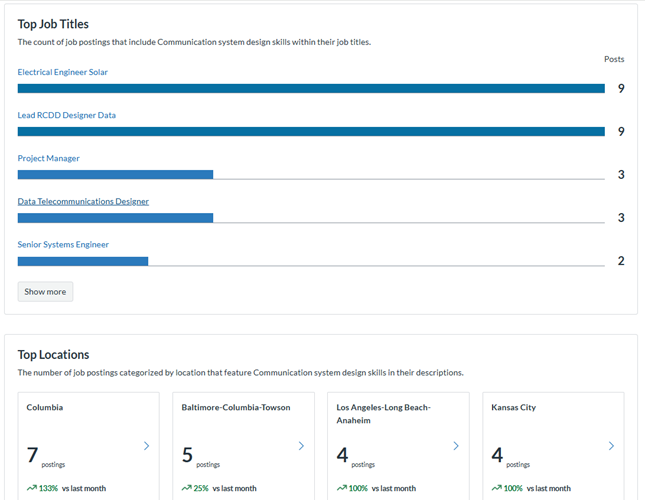
Parchment Digital Badges also links to a full Skills taxonomy of more than 43,000 verified skills, powered by TalentNeuron. Current employment and job listing data can be embedded into digital badges using the Skills feature.
For more information on digital badging, including videos, specific resources to help you brainstorm and create your digital badging strategy, and information needed for badge creation, please visit our website or reach out to iubadges@iu.edu.